Your long videos, cut into daily Shorts that bring viewers back.
I find the best moments in every episode, cut them vertical with captions and a hook, and post them to TikTok, Instagram Reels and YouTube Shorts on a schedule. You keep filming. I keep your channel in the feed.
One episode in, a week of clips out
My pipeline scans the whole video, scores the moments, reframes each one to 9:16 on whoever is talking, and adds word-by-word captions. Scroll, and watch one recording become a clip.
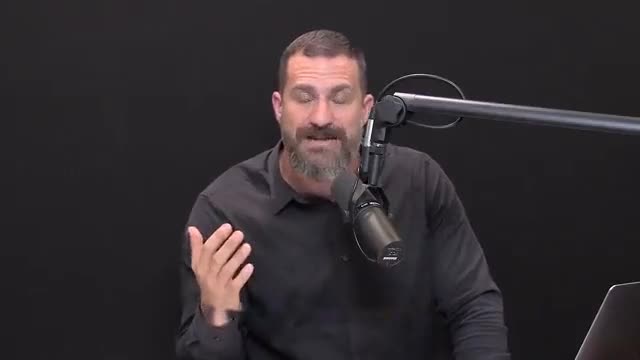
The long recording
The full episode, as uploaded. Nothing to prepare.
15:09 → 15:41The moment picked
Scored on hook, payoff and whether it works on its own.
Vertical 9:16 crop
The crop follows the speaker, so faces stay in frame.
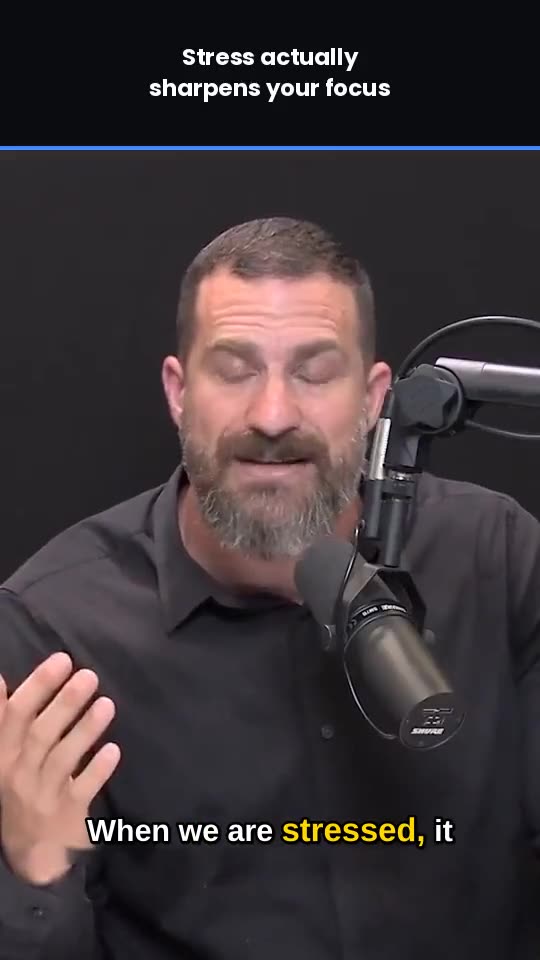
Hook title + captions
A hook for the first second, captions word by word.
Scheduled and posted
To TikTok, Reels and Shorts at your audience’s peak time.
Fig. 1 One recording becoming one clip, stage by stage. Footage from my own clip accounts; the file name and timestamps are examples.
Three moments from one episode
Pick a marker to see the clip it became. The labels are what I look for: a hook, a reaction, a story.
Fig. 2 Moment selection. The three markers are real clips from this episode; the timeline is an illustration, not a live process.
Before and after
Left: the wide recording, playing, before the reframe. Right: the finished 9:16 clip with the hook title and the crop following the speaker. Both run in sync; drag the handle, or use the arrow keys.
same recording, same moment — only the edit changedFig. 3 The wide recording against the finished vertical clip, same moment.
A finished clip
This is the file a client would get: 9:16, captions burned in, hook on screen, ready to post.
← the whole edit, start to finishThe same clip, dressed for each platform
One clip is cut once. What changes per platform is the caption, the hashtags and the posting time, not the video.
Cut once, posted three times
Each platform gets its own caption and hashtags and its own slot in the schedule. The clip itself, the crop, the captions and the hook stay identical, so your channel looks the same everywhere.
the layouts are sketches of each feed, not screenshotsFig. 4 One finished clip in three feed layouts. The handle and the feed chrome are illustrative; the clip is real.
You film. I do the rest.
Three steps, and only the first one is yours.
You upload as usual
Every new long video or episode on your channel goes straight into my clipping pipeline. Nothing to send, no extra work.
I cut the moments
Hooks, reactions, stories and one-liners are picked, reframed to 9:16, captioned word by word and branded to your channel.
They go out daily
Clips are scheduled across TikTok, Reels and Shorts, or delivered as ready-to-post files if you'd rather post yourself.
Fig. 5 The whole pipeline on one sheet. Posting for you needs access you grant on each platform; otherwise clips are delivered as files for you to post.
What my own clip accounts did in September
These are my own clip accounts, not client accounts: I run this exact pipeline on them first. Your numbers depend on your content and audience.
One outdoor clip account on Instagram, in a single month.
Fig. 6 Numbers from my own clip accounts, read from Instagram Insights and TikTok on 28–29 Sep 2026. Your results depend on your content and audience.
Every clip includes
Standard on every plan, every clip.
- Vertical 9:16 reframe that keeps faces and action in frame
- Word-by-word burned-in captions
- An on-screen hook title written for the first second
- Your handle and branding, subtle and consistent
- Captions and hashtags written for each platform
- No duplicate or near-duplicate posts
- A monthly report: what got views and what to film more of
- You own everything. Files are yours to keep.
Pick how many clips a day
Month to month, cancel any time. Every plan starts with 5 free clips so you can see the work before you pay for it.
Starter
- 60 clips a month (2 a day)
- Delivered as ready-to-post files
- Captions + hashtags included
- You post them
Growth
- 150 clips a month (5 a day)
- I post to TikTok, Reels and Shorts (with access you grant)
- Scheduled at your audience's peak times
- Monthly performance report
Scale
- 300–360 clips a month (10–12 a day)
- All three platforms, posted for you (with access you grant)
- Weekly report + content suggestions
- Priority turnaround on new episodes
Custom
- Any number of clips
- Your platforms and posting schedule
- Mix clipping and video editing
- Tell me what you need and your budget
What a month looks like
150 clips · 5 a day · posted for you on TikTok, Reels and Shorts
Fig. 8 Clips per day over a 30-day month, by plan. Billed monthly, in USD or in EUR at the same number ($499 or €499), your choice. Posting for you needs access you grant to each platform; files are always yours.
Founding clients: the first three creators get 30% off for their first three months. Month-to-month, cancel anytime.
5 free clips from your latest video
No call, no card. Send me your channel link and you’ll have 5 finished clips within 48 hours. Keep them and post them either way.
- 1Send your channel link
- 2Get 5 clips in 48 hours
- 3Like them? Pick a plan.
Prefer email? cliplines.studio@gmail.com
Got it, thanks!
Your 5 free clips are on the way. I’ll email them to you within 48 hours.
Things people ask before they start
Do you post to my accounts, or do I?
Either. On Growth and Scale I post for you with scheduling access you grant. On Starter I deliver finished files and captions, and you post.
Who owns the clips?
You do. They're cut from your videos and delivered to you. I never post your clips anywhere except the accounts you choose.
How do you pick the moments?
My pipeline scans the whole video for hooks, reactions, stories and payoffs, then scores them. Each clip must make sense to someone who has never seen your channel.
What if a video has nothing clip-worthy?
I'd rather post fewer good clips than padding. Unused clips roll over to the next video.
What access do you need to post for me?
On Growth and Scale you connect your accounts through each platform’s own business or creator tools, the same way you’d add a scheduling app. I never ask for your password, and you can revoke the access at any time. On Starter nothing is connected: you get files.
How fast do clips arrive?
The 5 free clips within 48 hours of your request. On a plan, clips from a new upload are usually ready within 48 hours and go out on the daily schedule; Scale gets priority turnaround.
Can I cancel?
Yes, any time. Plans are month to month.
I have another question
Send it through the form above or email cliplines.studio@gmail.com and I'll get back to you within 24 hours.